Contents
1. Brief description
2. Procedure and control description
3. Parametrization
4. Connection types
1. Brief description
A simple process (single process) processes a maximum of one product at a time.
2. Procedure and control description
The information about the product to be processed arrives via a production order. A PPS, a subsequent supermarket or a Kanban object create production orders.
The process orders the basic products needed for the production order from a previous storage, supermarket or supplier.
Often processes are not only charged with production orders from only one production line, but also for production orders from other production lines.
Using the Foreign Order object, these shared resources can be projected onto the respective process object.
Further it can be distinguished whether the respective process contributes to the increase in value of the finished product or not.

Figure 1 - Procedure and control description
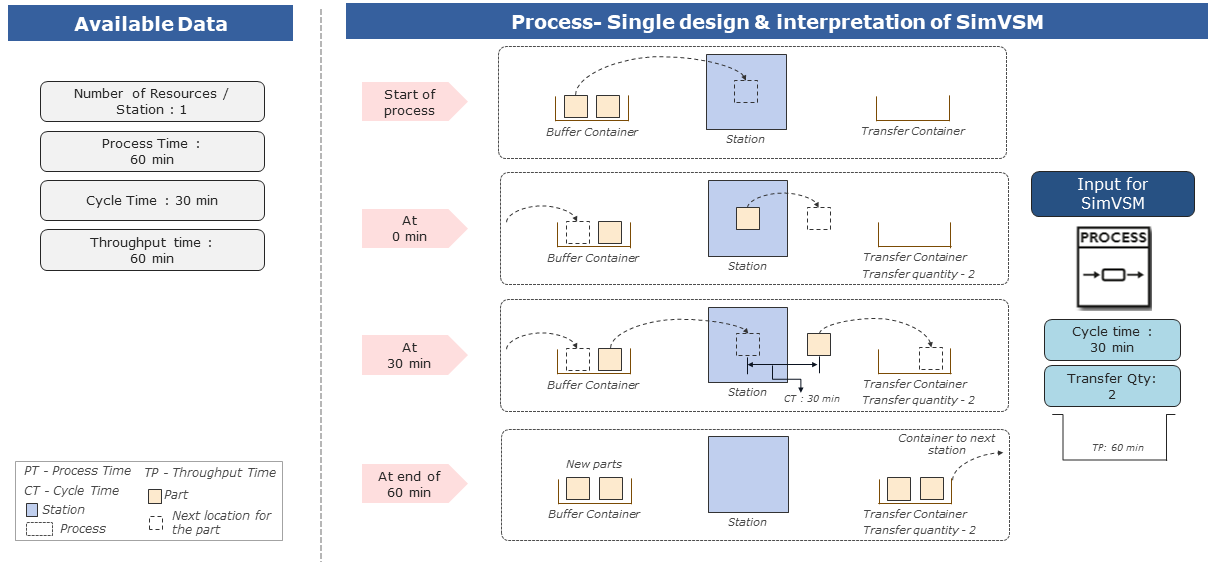
Figure 2 - Procedure and control description
3. Parametrization
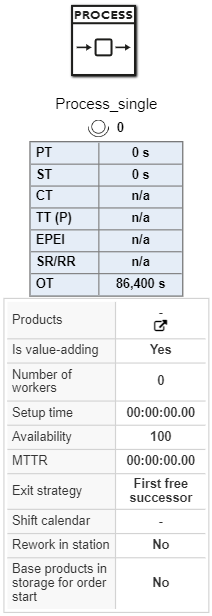
Figure 3 - Process (Single)
|
Process Parameter
|
Required
|
Description
|
|
no
|
Name of the process to be displayed in the VSM modeling area and statistics within the results section.
|
Products
|
no
|
List of unique products which must be processed within a particular station.
Each product is entered with individual attributes of name, base product, cycle time, transfer quantity etc.
|
|
no
|
A simple selection feature to determine if a process contributes to increase the value of the product.
This will influence the KPIs non-value-added lead time, value-added lead time and static flow grade displayed on the time line of the VSM model created.
If project option of highlighting value adding activities is selected then every valued added process will be highlighted green in color on the main modeling area.
|
|
yes
|
Number of workers assigned to a particular process.
This does not have impact in terms of station performance and static KPIs .
But it will have an impact on theoretical understanding of KPI “Theoretical number of workers” which helps in understanding, is the assigned man the optimum number.
|
Setup time
|
yes
|
Time required for the process to set-up the station when there is a product transition and new product(-type/name) has to be processed.
Setup time will have an impact on the static KPI of EPEI (every part every interval)
|
Create setup matrix
|
no
|
Input for setup time matrix for individual product family.
Input is provided in the form of table in combination of products (from/to)
|
|
yes
|
Percentage of time which the process operates or functions without any interference of failure.
Failures are randomly created only during working phase of process on one unit/part.
|
MTTR
|
yes
|
The average time required to repair a machine at the time of failure.
MTTR in general is calculated by adding TTR (time to repair) of all failures divided by total number of failures.
|
|
yes
|
Logic according to which the products leave the object.
Available modes:
•Cyclic (blocking):
To move the parts cyclically to the next successor in line. But this is a blocking strategy, that is when a part has to be transferred to station 3 then the upstream process waits until station 3 is available for processing. Until then the upstream process will wait and be blocked.
•Start with successor 1:
To always move the part to successor with the number 1. It only takes the other successors into consideration when this is not possible.
•First free successor:
To always move the part to successor which is free and is available for processing the parts.
•Lowest usage:
To move the parts to the successor with the lowest relative occupancy.
|
|
no
|
References to a shift model which is created in the project options.
Absence of shift model will be considered as 24h shift model for all the objects during simulation.
|
|
no
|
Determines whether a product must be reworked within the station or reworked at an external station.
Based on random calculations of the rework rate, additional waiting time for a random single object will be executed.
|
|
no
|
Indicates of an information flow control feature for the process.
This indicates that all the necessary base products should be available in the supplying storage for the process to activate the order within its order queue.
|
|
no
|
Additional notes or details pertaining to individual objects can be visualized in the form of texts through comment object.
Comment objects can be enhanced for color, font size, font color etc.
|
Product Parameter
|
Required
|
Description
|
Product
|
yes
|
Final product which will be produced at the station and will leave the station to next downstream process.
|
Base product
|
yes
|
Incoming base product which is used to produce the final product which leaves the station.
|
|
yes
|
Number of base products required to manufacture the station final product which leaves the station or process.
This is a key parameter, as the total number of parts to be produced is calculated by the PPS depends on this particular XBP value. This also impacts the product graph created for the value stream
|
|
yes
|
Lot size determines the quantity in which the products should be produced.
Lot size is a rounding size for incoming orders. E.g., if lot size is 20 and incoming order from the PPS is 55, then Order size of 60 is provided as input for the process. In addition to this size will be split up into 3 orders of 20
|
Planned cycle time
|
no
|
Average planned cycle time per product.
|
Cycle time
|
yes
|
Time interval between two products leaving the station within the process object.
This is independent of lot size.
|
Transfer quantity
|
yes
|
Required quantities of products which must be placed in one carrier for transportation to next downstream object.
This is independent of lot size.
|
|
yes
|
Rework rate (RR) provides information regarding the percentage of parts which are found to be defective and undergoes rework.
If rework within station is selected, then the rework happens within the station with and additional waiting time equal to rework time for the part.
If the rework is external, then the parts to be reworked would be moved to external rework station
|
|
yes
|
Scrap rate (SR) provides information regarding the percentage of parts to be scrapped or deleted post processing within the station.
|
|
no
|
Position of the order in the order list. The higher the priority, the earlier the order is processed.
|
Min. reworking time
|
yes
|
Minimum rework time of a product. Applicable only when the rework in station option is selected.
|
Max. reworking time
|
yes
|
Maximum rework time of a product. Applicable only when the rework in station option is selected.
|
|
4. Connection types
See chapter Possible connections to objects.
© SimPlan AG - Hanau District Court, Commercial Register (Part B) 6845 - info@simplan.de - www.simplan.de/en