Contents
2. Procedure and control description
2.1 Supermarket object Overview
2.2 Supermarket Constellations: With information flow and with Kanban
2.3 Sample Use case - Placement of supermarket orders through PPS
2.4 Sample Use case - Placement of supermarket orders through Kanban
2.5 Understanding order flow to predecessor
Similar to the inventory object, the supermarket object is a passive picking inventory as a predecessor to order-driven processes (or of the customer).
Thus, analogous to the simple (withdrawal) inventory, parts are put into stock via push, however, the supermarket warehouse can reorder parts itself based on parts withdrawals via information flow and reporting point procedure or via Kanban flow.
2. Procedure and control description
An inventory receives products on a workpiece carrier, removes them and stores the parts.
With storage, products are thus mathematically compressed onto workpiece carriers, i.e. with workpiece carrier limitation, only the theoretical capacity of the forwarding quantity of the process predecessors is assumed.
If products are required for a subsequent process object, they are forwarded to the requesting process on workpiece carriers.
The workpiece carrier capacity is also reused by the preceding processes;
depending on the requested order quantity of the succeeding process, workpiece carriers from the warehouse towards the succeeding process may not be completely filled (according to the maximum capacity of the forwarding quantity from the preceding process).
If there are not enough parts stored for an order from a downstream process, the requesting object must wait until parts arrive and have been stored.
After the product has been put away, all waiting objects will be notified for a new parts request.
Note that it may happen again that not all part requests can be fulfilled and that the requesting parts will have to wait again.
As an extension to the normal inventory, the supermarket determines after a part withdrawal whether parts should be ordered via an information flow or Kanban successor for replenishing the supermarket.
The two control mechanisms are thereby exclusive, i.e. either a supermarket is controlled over a reporting point procedure with information flow edge (to a successor) or over a Kanban constellation.
If the supermarket is controlled via an information flow edge, the parameters for reorder point and maximum stock are used.
If a part reaches the reorder level at the time of withdrawal, then as many parts are ordered via information flow successors until the maximum stock level is reached. Due to lot sizes in supplying, controlled processes, this quantity can also be overridden.
If a combination of supermarket and Kanban successor is used, the defined reorder level and maximum stock per product is ignored.
The reordering takes place on Kanban card basis, i.e. if a Kanban card in the camp becomes completely free, this is available again is steered in as order along the Kanban production definition.
The defined initial stock when modeling with Kanban is rounded up to full Kanban cards.

Figure 1 - Supermarket object overview
Supermarket Constellations: With information flow and with Kanban

Figure 2 - Supermarket Constellations: With information flow and with Kanban
Sample Use case - Placement of supermarket orders through PPS

Figure 3 - Placement of supermarket orders through PPS
Case 1 – Lot Size: 1

Figure 4 - Case 1 – Lot Size: 1

Figure 5 - Case 1 – Lot Size: 1

Figure 6 - Case 1 – Lot Size: 1
Case 2 – Lot Size: 100
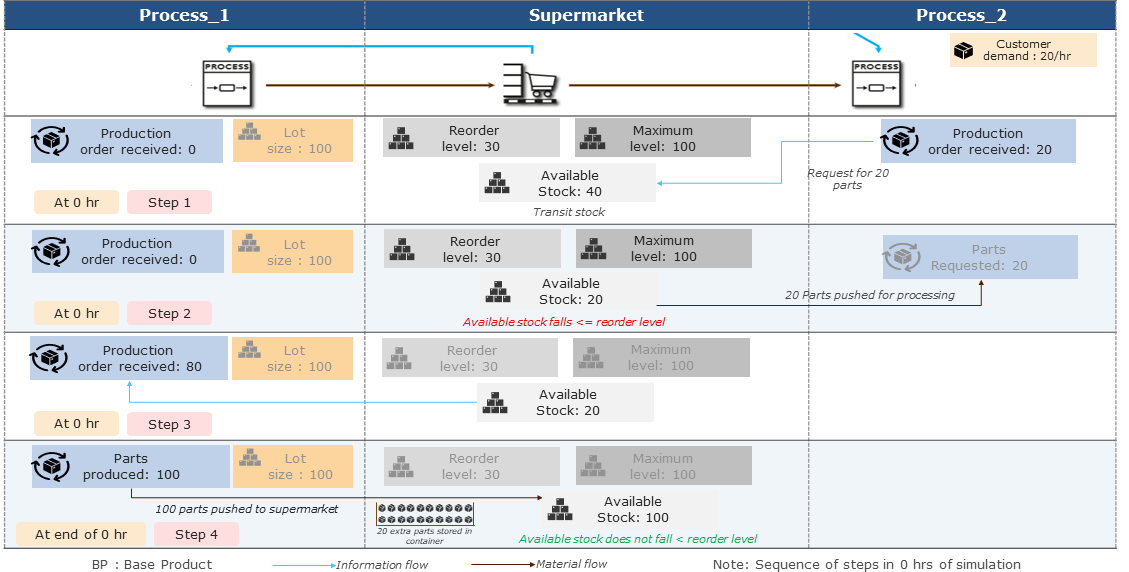
Figure 7 - Case 2 – Lot Size: 100
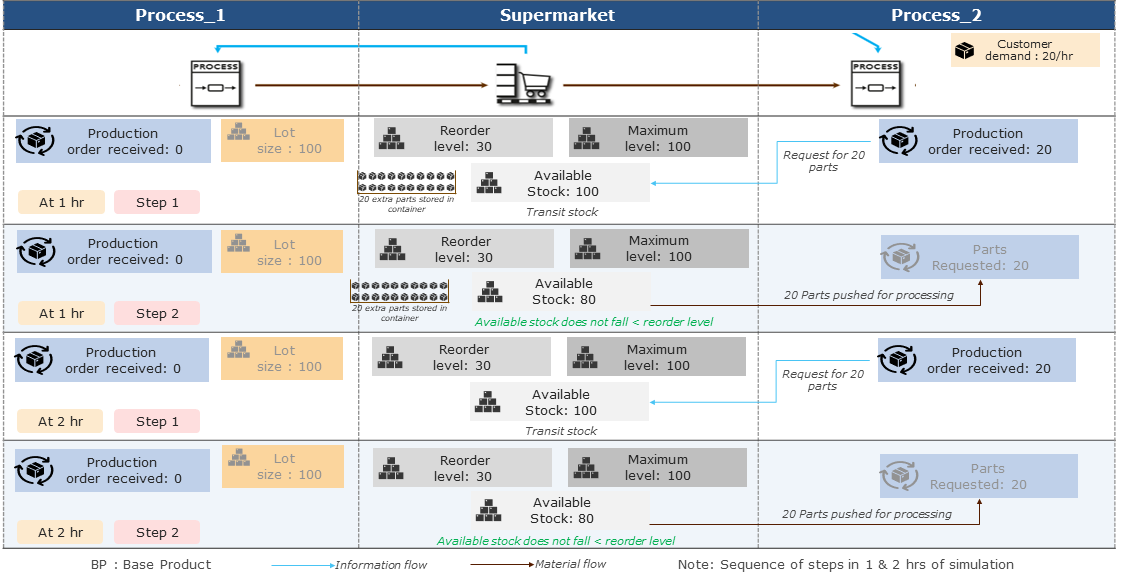
Figure 8 - Case 2 – Lot Size: 100

Figure 9 - Case 2 – Lot Size: 100
Sample Use case - Placement of supermarket orders through Kanban

Figure 10 - Placement of supermarket orders through Kanban
Placement of orders only based on Kanban cards

Figure 11 - Placement of orders only based on Kanban cards

Figure 12 - Placement of orders only based on Kanban cards
Placement of orders only based on Kanban cards – Initial Stock
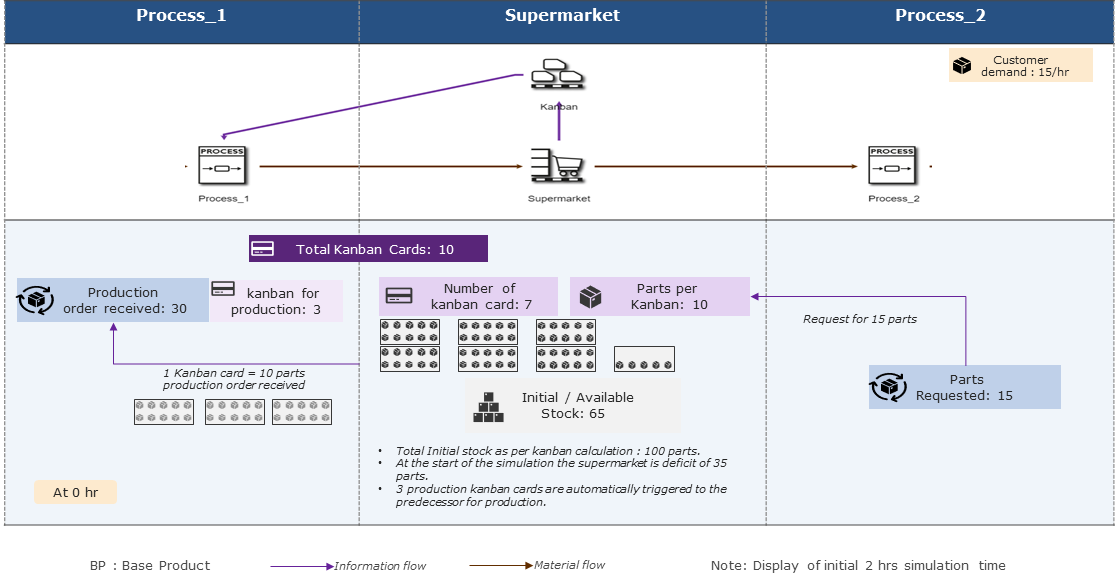
Figure 13 - Placement of orders only based on Kanban cards – Initial Stock
Placement of orders only based on Kanban cards

Figure 14 - Placement of orders only based on Kanban cards
Traffic Light Kanban - Understanding flow of parts (1)

Figure 15 - Traffic Light Kanban - Understanding flow of parts (1)
Traffic Light Kanban - Understanding flow of parts (2)

Figure 16 - Understanding flow of parts (2)
Understanding order flow to predecessor : Case 1

Figure 17 - Understanding order flow to predecessor : Case 1

Figure 18 - Understanding order flow to predecessor : Case 1
Figure 19 - Supermarket |
|

See chapter Possible connections to objects.
© SimPlan AG - Hanau District Court, Commercial Register (Part B) 6845 - info@simplan.de - www.simplan.de/en