Contents
2. Procedure and control description
The FIFO (First In First Out) object is mostly used in Kanban lines or in push constellations, where the FIFO objects connect approximately two consecutive objects of the type process.
2. Procedure and control description
The objects Transport (internal) and FIFO share the behavior.
The FIFO route induces PUSH control, i.e. subsequent process objects may not be controlled by info flow (local orders are generated accordingly by part input).
After entering the object, products (in conveyors) are passed on to a successor in the same order in which they entered the object, after a time consumption (transport duration as minimum dwell time).
The handover is active, i.e. when a successor is ready to receive products, conveyors with products are pushed on.
Products cannot overtake on the FIFO line.
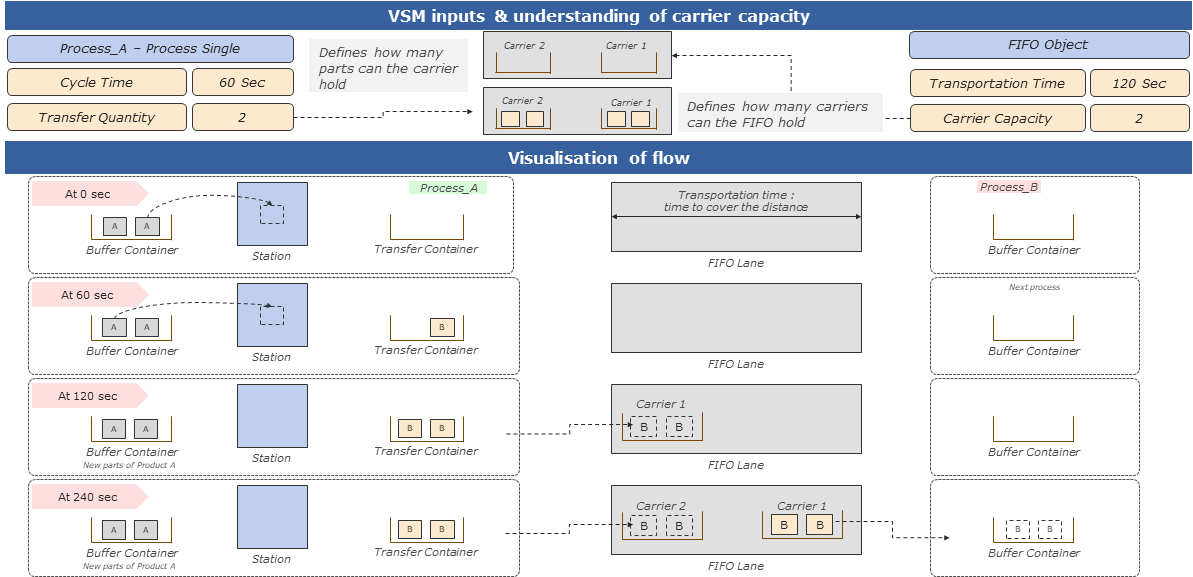
Figure 1 - Procedure and control description
Impact of transfer quantity & Carrier capacity with blocked downstream process
•FIFO object can carry 4 carriers in total at a time.
•Each carrier in the FIFO object can hold 2 parts each, which is the transfer quantity.
•With order quantity of 10 and FIFO capacity of 4, one container will be blocked inside the station and the station is also blocked.
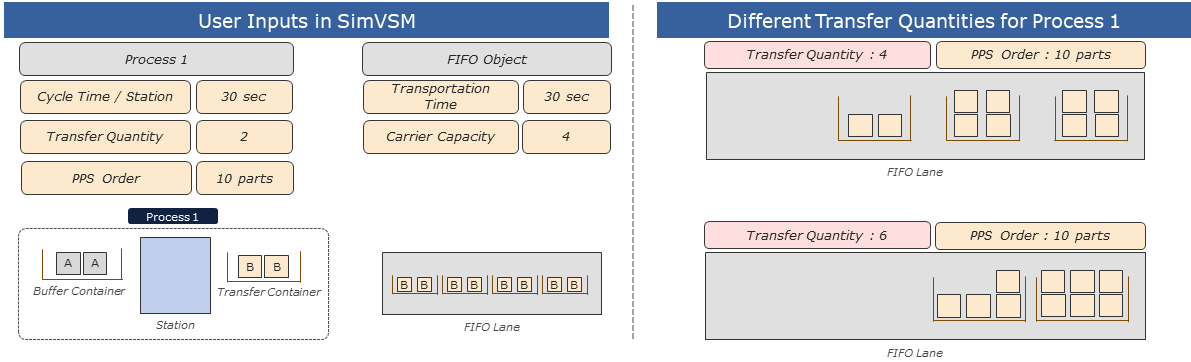
Figure 2 - Impact of transfer quantity & Carrier capacity with blocked downstream process
Figure 3 - FIFO |
|
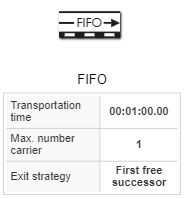
See chapter Possible connections to objects.
© SimPlan AG - Hanau District Court, Commercial Register (Part B) 6845 - info@simplan.de - www.simplan.de/en